JSON DIFF

JSON Diff Tool - Compare JSON Files

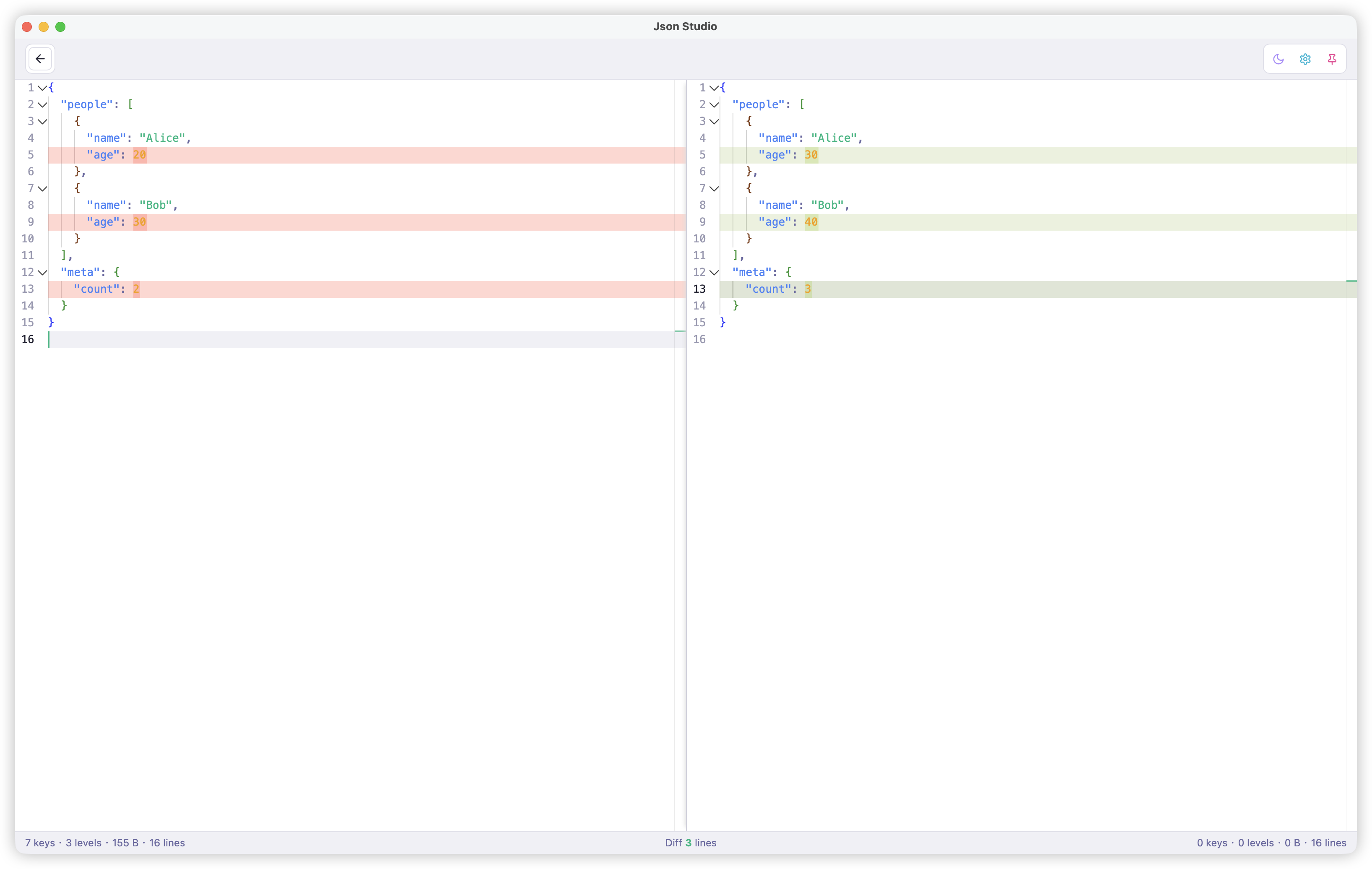
Compare two JSON files side by side with real-time syntax highlighting. See added, deleted, and modified lines instantly. Perfect for comparing API responses, config files, or data snapshots.

Download JsonStudio View All Features
JSON Diff Tool in JsonStudio

What is JSON Diff?

JSON diff (or JSON comparison) is the process of comparing two JSON files to identify differences between them. JsonStudio's JSON diff tool displays both files side by side with color-coded highlighting to show what's been added, deleted, or modified.

Why Use JsonStudio JSON Diff Tool?

JsonStudio's JSON diff tool is a native desktop application that outperforms online JSON diff tools in speed, privacy, and features.

Real-time Comparison

See differences instantly as you edit, no need to click "Compare".

Color-coded Highlighting

Green for additions, red for deletions, yellow for modifications.

Diff Statistics

Status bar shows count of added, deleted, and modified lines.

Complete Privacy

All comparison happens locally, your data never leaves your machine.

Large File Support

Compare multi-MB JSON files without browser freezing.

No Ads

Clean interface focused on productivity.

Offline

Works without internet connection.

JSON Diff Features

Side-by-Side View

Compare two JSON files in a split-pane view with synchronized scrolling.

Syntax Highlighting

Full JSON syntax highlighting with bracket pair colorization for easy reading.

Diff Statistics

Real-time statistics showing number of added, deleted, and modified lines.

Inline Editing

Edit both JSON files directly in the diff view and see changes update in real-time.

How to Use JSON Diff in JsonStudio

  1. Download and install JsonStudio from GitHub Releases
  2. Open the Diff tool from the left sidebar
  3. Paste or load your first JSON file in the left pane
  4. Paste or load your second JSON file in the right pane
  5. View differences – additions (green), deletions (red), modifications (yellow)
  6. Check statistics in the status bar for a summary of changes

JSON Diff vs Online Tools

Here's why JsonStudio's JSON diff tool is superior to online alternatives:

Frequently Asked Questions

Is JsonStudio JSON diff tool free?

Yes, JsonStudio is completely free and open source (MIT License). The JSON diff feature is included with no limitations.

Can I compare large JSON files?

Yes, JsonStudio can compare JSON files of several megabytes smoothly. It's built with Rust for high performance.

Does it work offline?

Yes, JsonStudio works 100% offline. All JSON comparison happens locally on your computer.

What platforms are supported?

JsonStudio is available for macOS, Windows, and Linux. Download from GitHub Releases.

Can I edit JSON while comparing?

Yes, both JSON editors in the diff view are fully editable. Changes are reflected in real-time with updated highlighting.

Ready to Compare JSON Files?

Download JsonStudio and experience the best JSON diff tool.

Download Now View on GitHub